TypeSafe
TypeSafe's Jev is a decision model rather than a chat model. Instead of returning free text, it takes a state (a ticket, a record, a message, or any text) along with a set of typed questions, and returns one typed answer per question with probabilities and a confidence value. Because the answers are structured, they can be bound directly to components, used in conditional logic, or written back to a database without any parsing.
With the TypeSafe datasource you can:
- Route a record to the right team, queue, or category, and see the probability of every option.
- Score severity, sentiment, or risk on an ordered scale that you define.
- Ask yes/no questions and receive the probability that the answer is yes.
- Ask several questions about the same state in a single query.
Before following this guide, it is assumed that you have already completed the process of Using Marketplace plugins.
Connection
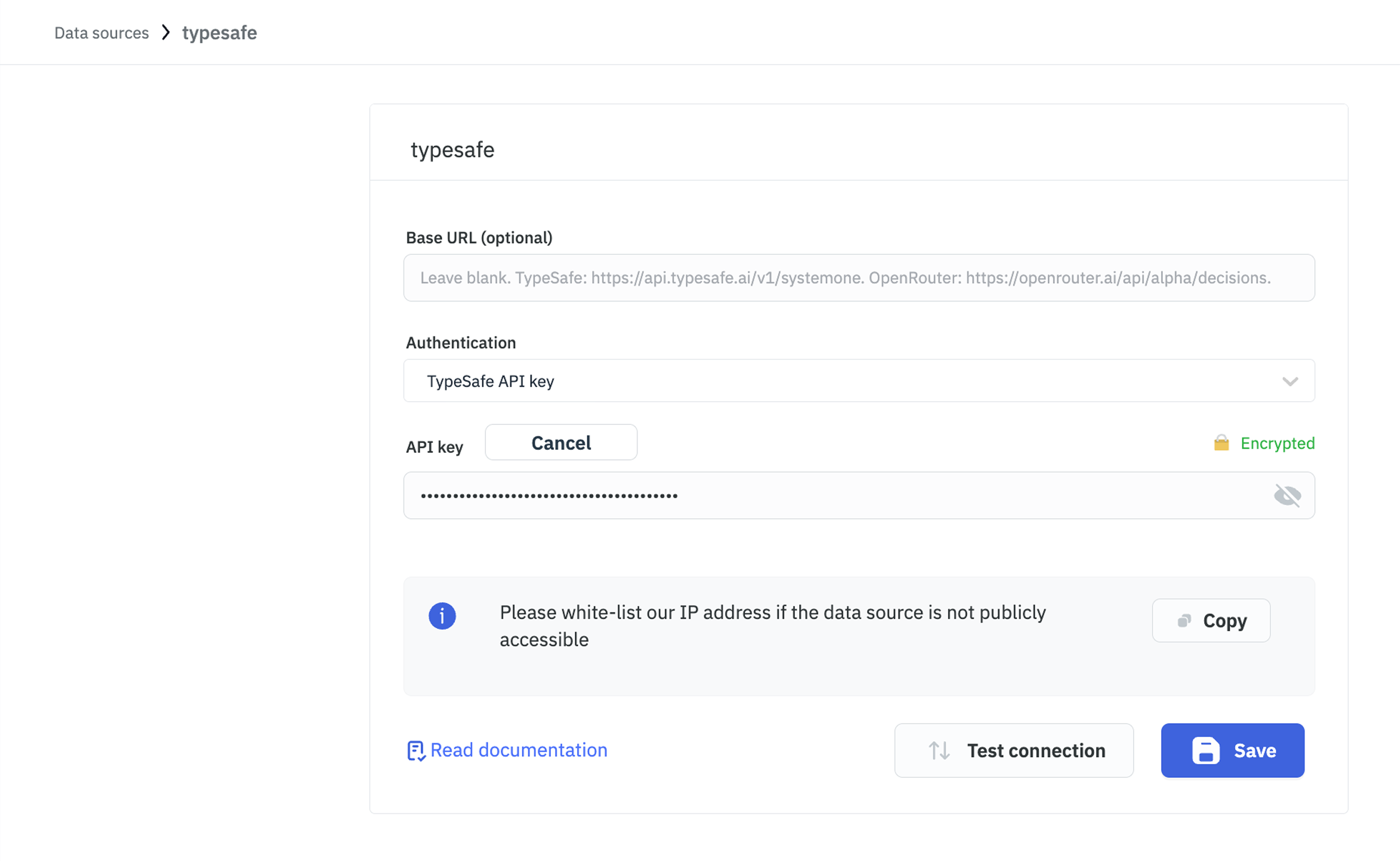
TypeSafe supports two authentication methods. Select one from the Authentication dropdown while configuring the datasource.
TypeSafe API Key
Use a key generated from the TypeSafe Console. Requests go to https://api.typesafe.ai/v1/systemone.
| Field | Required | Description |
|---|---|---|
| Authentication | Yes | Set to TypeSafe API key. This is the default. |
| API key | Yes | Your TypeSafe API key. Stored encrypted and sent as a bearer token. |
| Base URL (optional) | No | Leave blank to use the default endpoint. |
OpenRouter API Key
Jev is also served through OpenRouter, on its decisions endpoint at https://openrouter.ai/api/alpha/decisions. Use this method if your workspace already routes AI spend through OpenRouter.
| Field | Required | Description |
|---|---|---|
| Authentication | Yes | Set to OpenRouter API key. |
| OpenRouter API key | Yes | Your OpenRouter key. Stored encrypted and sent as a bearer token. |
| Base URL (optional) | No | Leave blank to use the default endpoint. |
Both endpoints take the same request body and return the same response, so a query written against one authentication method works unchanged against the other. Only the default model name differs.
Base URL
Base URL (optional) is shared by both authentication methods. Leave it blank unless you need to override the endpoint, for example to point the datasource at a proxy or a future API version. When set, it replaces the default endpoint for the selected authentication method.
Supported Operations
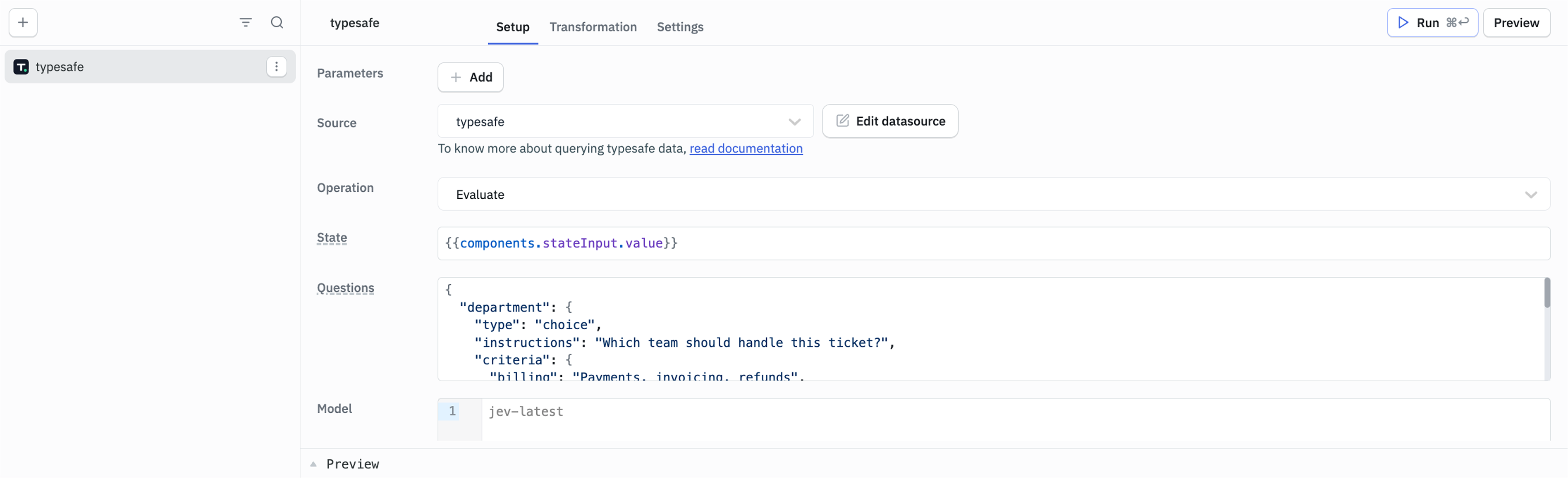
Evaluate
Evaluates a state against a map of typed questions and returns one typed answer per question.
Required Parameters
-
State: What to decide about. Plain text is sent as text, for example
{{components.stateInput.value}}. Objects and arrays, and strings containing JSON, are sent as structured state, so you can pass a component or query value directly. A string that starts with{or[but does not parse is sent as text rather than failing the query. -
Questions: A JSON object that maps a question id to a typed question. Each question takes a
type, aninstructionsstring, and, depending on the type, acriteriavalue. Answers are returned under the same ids.
Optional Parameters
- Model: The Jev model to use. Leave it blank to use the default for your authentication method. See Model.
Keep the state focused on the fields your questions actually need. Jev reads the state literally, and large amounts of unrelated detail reduce accuracy.
Question Types
| Type | What it answers | criteria |
|---|---|---|
choice | Picks one option from a set | Required. A map of option id to a short description. At least two options. |
score | Rates the state on an ordered scale | Required. An array of at least two level labels. Keep them in order, since the returned score is a weighted index into this list. |
noul | Answers a yes/no question | Optional. An object with true and false keys describing each outcome. |
Every question also needs a non-empty instructions value. Questions are validated in ToolJet before the request is sent, so an invalid question fails fast and the error names the question id.
Example Values
State
{{components.stateInput.value}}

Questions
{
  "department": {
    "type": "choice",
    "instructions": "Which team should handle this ticket?",
    "criteria": {
      "billing": "Payments, invoicing, refunds",
      "technical": "Bugs, outages, integrations",
      "sales": "Pricing, upgrades, new accounts"
    }
  },
  "urgent": {
    "type": "noul",
    "instructions": "Is this time-sensitive?",
    "criteria": {
      "true": "The customer is blocked right now",
      "false": "The customer can wait for a normal response"
    }
  },
  "mood": {
    "type": "score",
    "instructions": "How frustrated is the customer?",
    "criteria": ["Calm", "Frustrated", "Very angry"]
  }
}

Model
jev-latest
Response Example
{
  "model": "jev-latest",
  "answers": {
    "department": {
      "type": "choice",
      "choice": "billing",
      "probabilities": {
        "billing": 0.67,
        "technical": 0.24,
        "sales": 0.09
      },
      "confidence": 0.88
    },
    "urgent": {
      "type": "noul",
      "noul": 0.94
    },
    "mood": {
      "type": "score",
      "score": 1.58,
      "legend": {
        "0": "Calm",
        "1": "Frustrated",
        "2": "Very angry"
      },
      "probabilities": {
        "0": 0.09,
        "1": 0.24,
        "2": 0.67
      },
      "confidence": 0.79
    }
  },
  "usage": {
    "input_tokens": 212,
    "output_tokens": 18
  }
}
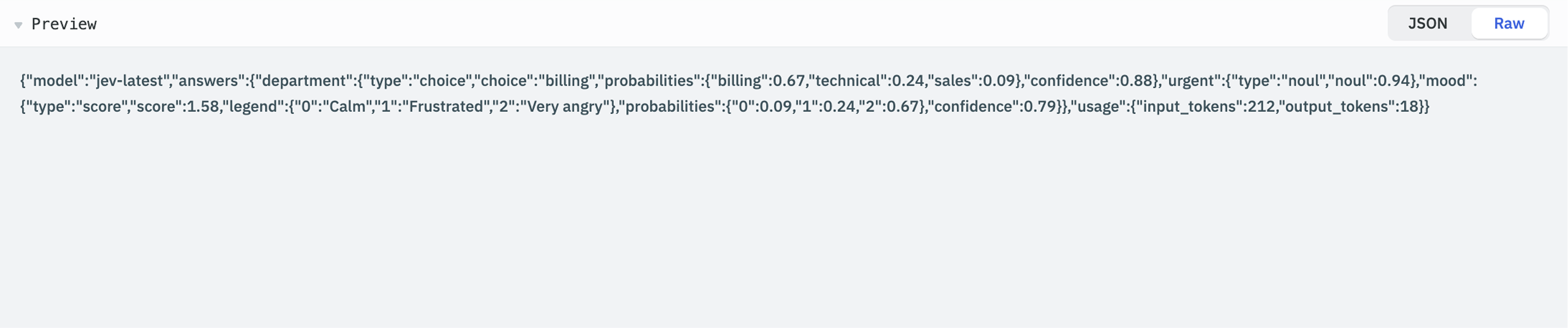
ToolJet does not transform the response. The query exposes it exactly as the API returned it, at {{queries.<query name>.data}}, so use TypeSafe's API reference for the fields each answer type contains.
Model
Leave Model blank and each authentication method uses its own default: jev-latest for TypeSafe, and typesafe/jev-1.13 for OpenRouter.
To pin a specific version, enter the plain model name, such as jev-1.13. The datasource checks which option is selected in the Authentication dropdown and adjusts the name to the form that endpoint expects, so the same query keeps working if you switch authentication methods later. Entering a fully qualified name such as typesafe/jev-1.13 works too.
Errors
Questions are validated before any request is sent, and the message names the offending question id and what is wrong with it. Failures from the API carry the provider's own message, so the text you see in the query panel is TypeSafe's, not ToolJet's.
Two things the error text does not tell you:
- The connection form does not require an API key. A datasource saved without one saves cleanly and then fails at query time with
TypeSafe API key is missing. - Requests time out after 60 seconds, and rate-limited (429), unavailable (503), and overloaded (529) responses are retried twice automatically. A query that fails this way has already made three attempts.
Need Help?
- Reach out via our Slack Community
- Or email us at [email protected]
- Found a bug? Please report it via GitHub Issues