ToolJet 3.0 Migration Guide Self-Hosted
ToolJet 3.0 is a new major version, including breaking changes that require you to adjust your applications accordingly. We will guide you through this process and mention a few important changes.
Before upgrading, we recommend reviewing your existing applications for any usage of deprecated features. Addressing these ahead of time will help reduce the work needed to upgrade to ToolJet 3.0.
For complex applications, we also recommend setting up thorough testing procedures to ensure your apps function correctly after the upgrade.
Upgrading to ToolJet 3.0
Prerequisites ⚠️
Before attempting to upgrade to the ToolJet 3.0:
- Database Backup: Create a complete backup of your database
- Application Review: Check your apps for breaking and deprecated features listed in this guide.
- Test Environment: Only attempt upgrade in a testing environment first.
To upgrade, update your Docker image to:
tooljet/tooljet:v3.0.0-ee-lts
This is a beta release. Test thoroughly in a non-production environment first.
Breaking Changes
The following changes are breaking and require immediate action to ensure your applications continue to function correctly after the upgrade.
Dynamic Input Restrictions
You can no longer dynamically change references to component names.
Action Required
- Review your applications for any dynamic component name references and refactor as necessary
- Replace all dynamic component references with static references
- Test all component interactions after making these changes
Examples and Details
The following patterns are no longer supported:
-
Using variables to construct component names:
// This will no longer work
{
  {
    components[variables.componentNameVariable].value;
  }
} -
Dynamically referencing components:
// This is not supported
{
  {
    components["textinput" + components.tabs1.currentTab].value;
  }
} -
Dynamically accessing nested properties:
// This dynamic property access is not allowed
{
  {
    components.table1[components.textinput1.value];
  }
}
Instead, use static references to components:
{
  {
    components.textinput1.value;
  }
}
{
  {
    components.table1.selectedRow;
  }
}
{
  {
    queries.query1.data;
  }
}
Component and Query Naming
This is only an issue during the upgrade process. Once your application is running on ToolJet 3.0, you can use identical names for components and queries without any problems.
Action Required
- Review your applications for any instances where queries and components share the same name
- Temporarily rename either the component or the query to ensure unique names
- Document all renamed components/queries for potential post-upgrade reversion
- Test affected components and queries after renaming
Details and Examples
When upgrading, if a component is referencing a query with the same name, the upgrade process may break that mapping. This occurs because ToolJet previously used a global ID-to-name map for both components and queries, which is now split in 3.0.
Example scenario: If a table component named userData is referencing a query also named userData, this reference may break during the upgrade process.
Property Panel Logic
Action Required
- Review all property panel variable checks
- Update any existing variable existence checks to use the new recommended format
- Remove any instances of unsupported logic patterns
- Test all components using variable checks after updates
New Variable Access Rules
There are changes to how you can access and check for the existence of variables in the property panel:
- For components, queries, and page variables, a minimum of two keys must be available after the
component/query/pagekeyword - For variables, a minimum of one key should be present after the
variableskeyword
// Supported formats
components.textinput1.value;
components?.textinput1?.value;
components["textinput1"].value;
queries.restapi1.data;
page.variables.name;
variables["name"];
variables.name;

// No longer supported
{
  {
    "name" in variables;
  }
}
{
  {
    Object.keys(variables).includes("name");
  }
}
{
  {
    variables.hasOwnProperty("name");
  }
}
// Recommended approach for checking existence
{
  {
    variables["name"] ?? false;
  }
}
These changes may affect how your application interacts with variables and components. Be sure to test thoroughly after making these updates.
Multi-Page Component Names
Action Required
- Review multi-page applications for components with identical names
- Either rename components to ensure uniqueness across pages
- Or modify queries to use query parameters instead of direct references
- Document all component name changes
- Test affected pages and their interactions after making changes
Current Limitations and Details
When the same component name exists on multiple pages and is linked to queries, the query will only work correctly on the page where the component was originally associated with it.
Example scenario:
- You have
page1andpage2, each containing a component namedtextinput1 - You create a query in
page1that is linked totextinput1 - The query will only function properly on
page1 - When you switch to
page2, the query will not work as expected, even though there's a component with the same name
When building multi-page applications, it's recommended to use unique component names across all pages to avoid any potential issues with query bindings.
Future resolution: We will be adding functionality to enforce unique component names across all pages in upcoming releases.
Removal of Deprecated Features
Kanban Board
The old deprecated Kanban Board component will cease functioning entirely. Applications using this component will crash after the upgrade if not updated.
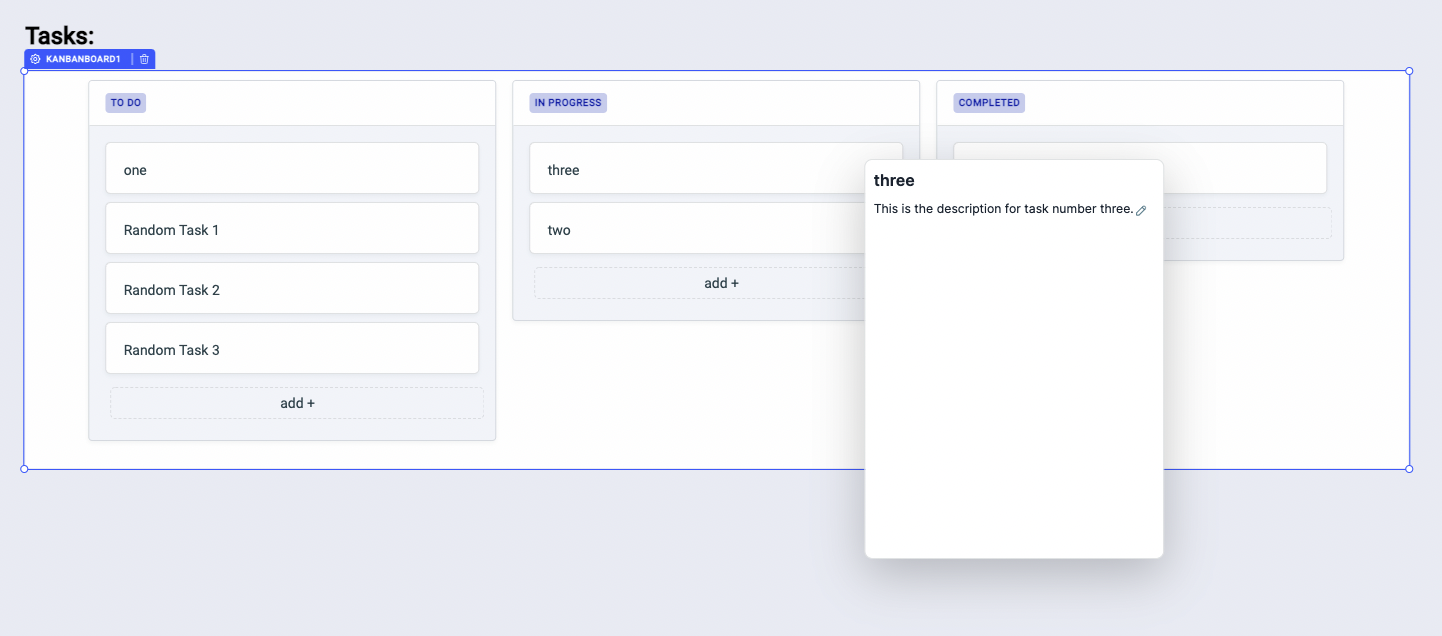
Required Actions
- Immediately identify all instances of the old Kanban Board component in your applications
- Create new boards using the new Kanban component.
- Transfer your data and configuration to the new component
- Remove the old Kanban Board components
- Update any queries or workflows that were connected to the old boards
- Test thoroughly to ensure all functionality is preserved
After the 3.0 upgrade, applications with the old Kanban Board component will crash and become unusable. Make sure to replace all instances of the old component with the new Kanban component before upgrading.
Local Data Sources
Action Required
- Identify all local data sources in your applications
- Migrate them to global workspace data sources
- Update all queries and components using these data sources
- Test all affected components and queries after migration
Action Required After Upgrade
If you haven't migrated your local data sources to global data sources, you will encounter an error message indicating that local data sources are no longer supported. For detailed instructions on migrating from Local Data Sources to the new Data Sources, please refer to our Local Data Sources Migration Guide.
Workspace Variables
Action Required
- Identify all uses of Workspace Variables
- Replace them with Workspace Constants
- Update all components and queries using these variables
- Configure appropriate role-based access for the new constants
- Test all affected functionality after migration
Workspace Constants are designed to be resolved on the server-side only, ensuring a high level of security. You can assign users to a specific role and provide create, update, and delete access to Workspace Constants.
For detailed instructions on migrating from Workspace Variables to Workspace Constants, please refer to our Workspace Variables Migration Guide.
Response Headers and Metadata
Action Required
- Identify all instances where response headers are being accessed
- Update the code to use the new metadata format
- Test all affected queries and components after migration
We've introduced a capability to expose additional information through metadata for all datasources. Previously, this was only available for REST API and GraphQL data sources.
Before, you could access response headers like this:
{{queries.<queryName>.responseHeaders}}
Now, you should use:
{{queries.<queryName>.metadata}}
The metadata object will contain detailed information about the request and response, including request URL, method, headers, parameters, response status code, and headers. You can read more about metadata here.
System Changes
ToolJet Database
ToolJet Database is now a core requirement for the ToolJet 3.0.
To use ToolJet Database, you'd have to set up and deploy PostgREST server which helps querying ToolJet Database.
Please check the environment variables that you need to configure to set up:
Help and Support
- Feel free to join our Slack Community or you can also e-mail us at [email protected].
- If you have found a bug, please create a GitHub issue for the same.